Voice Training: the deep dive
Voice accuracy is the thing that decides whether EchoRelay’s output is yours or just competent. So training isn’t a form - it’s a guided walkthrough: show it how you already sound, it drafts a voice, you approve every piece of it, then it generates real posts and learns from your corrections until it lands.
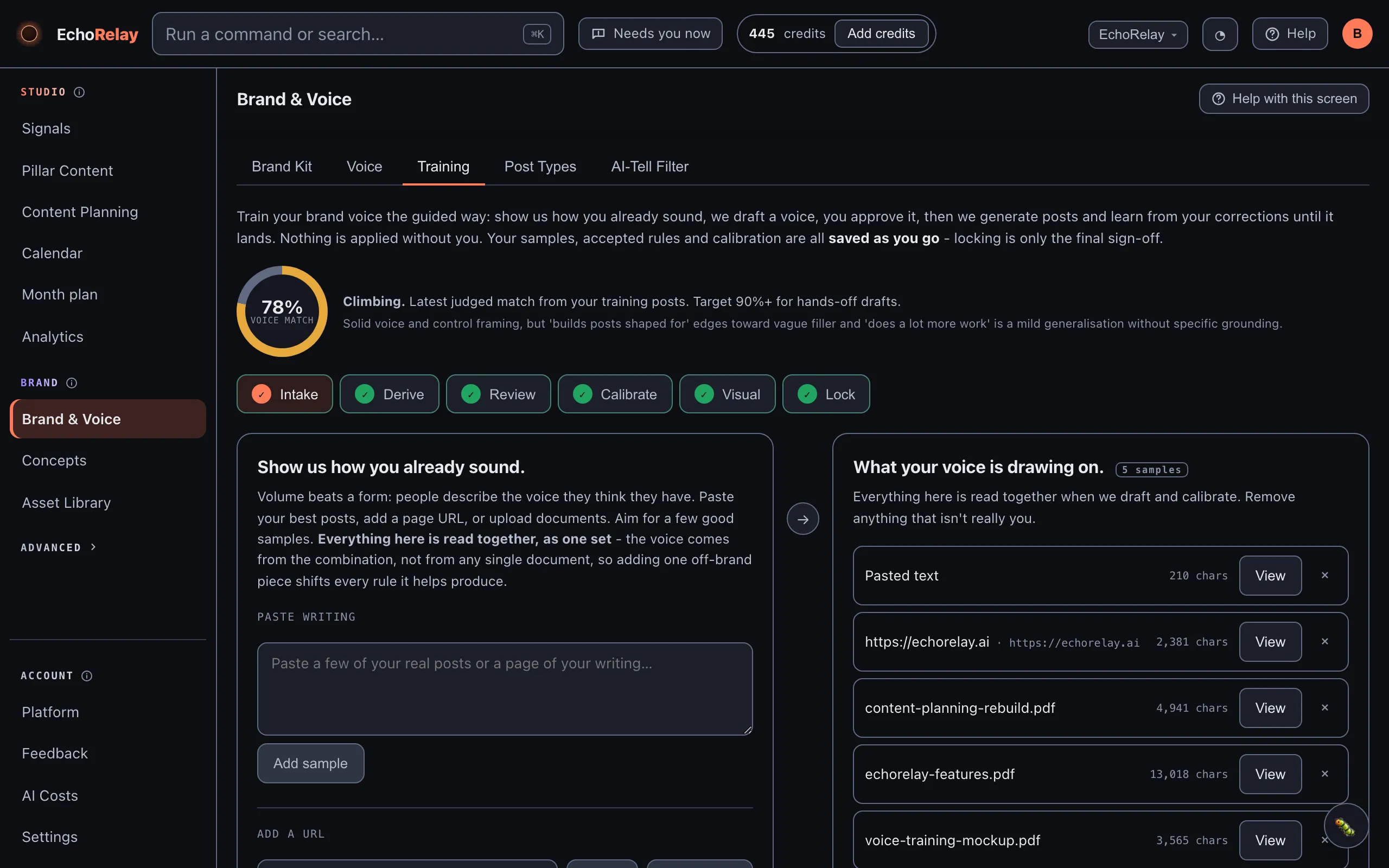
Three promises hold through the whole process:
- Nothing is applied without you. Every rule the model proposes waits for your accept.
- Everything is saved as you go. Samples, accepted rules and calibration persist the moment they happen - locking at the end is only the final sign-off, not the save.
- It fails honestly. Every model step either works or tells you the real reason it didn’t (no key connected, no samples yet, out of credits, the model didn’t respond). It never fabricates a voice, a post or a profile to fill the gap.
The walkthrough is six steps. You can click between them freely - completed steps show a tick.
Step 1 - Intake: show us how you already sound
Section titled “Step 1 - Intake: show us how you already sound”Training starts from your writing samples, not a questionnaire, because volume beats a form: people describe the voice they think they have. Your actual posts don’t lie.
- Paste writing - a few of your real posts, or a page of your writing.
- Add a URL - a blog post or page; EchoRelay reads it server-side and keeps the text.
A few good samples is the aim. Your samples stay listed at the top, each with its character count, viewable and removable - so you always know exactly what the voice is being drawn from.
Step 2 - Derive: it drafts a voice from your samples
Section titled “Step 2 - Derive: it drafts a voice from your samples”One click reads all your samples together and drafts a voice as a set of proposals: banned words, signature moves, markers, and your language. It takes 10 to 30 seconds, with a visible timer.
Derive is safe to re-run whenever you add new samples: it only proposes what’s new - it never duplicates rules you already have, and proposals you’ve already judged don’t resurface.
Step 3 - Review: you decide, it only ever suggested
Section titled “Step 3 - Review: you decide, it only ever suggested”Each proposal arrives as a card with the suggested rule, an example from your own writing, and the reasoning. For every one you choose:
- Accept - it becomes part of your live voice, applied to every generation from now on.
- Amend - fix the wording, change its kind or strength inline, then save and accept. Use this when a proposal is close.
- Dismiss - it goes away and won’t be proposed again.
The four kinds of rule
Section titled “The four kinds of rule”| Kind | What it is | Example |
|---|---|---|
| Rule (always / never) | A directive the voice must obey every time | “Never open with a question” |
| Banned word | A word or phrase to avoid - with a strength | “game-changer” |
| Approved move | A rhetorical move that’s characteristically yours | “close on the reader, not the product” |
| Marker | A signature turn of phrase or stylistic fingerprint | short verdict-first fragments |
Ban vs Rarely
Section titled “Ban vs Rarely”Banned words carry a strength. Ban means never. Rarely is the subtler tool: it kills the generic AI-overuse of a word while keeping the genuine use. You don’t have to choose between “the model says journey constantly” and “I can never say journey again”.
Accepted rules are live immediately and stay editable on the Voice tab - review is a starting point, not a cage.
Step 4 - Calibrate: fix real posts until the fixes dry up
Section titled “Step 4 - Calibrate: fix real posts until the fixes dry up”This is where the voice gets sharpened against reality. EchoRelay generates a real post in your brand voice; you mark what’s off; it learns; you generate a fresh one and do it again.
One idea matters here: the voice is one voice everywhere. Picking a channel (LinkedIn, Instagram, X…) changes the format and length of the training post - but every fix you make trains the brand voice, not just that platform.
The loop:
- Generate a training post.
- Something off? Quote the exact bit (optional) and say what’s wrong in your own words - “too breathless”, “we’d never call customers ‘users’”, “shorter sentences”.
- Read my note back - EchoRelay classifies your note into a proposed rule and shows you what it understood, as a card. If it read you wrong, hit Not quite or Amend before anything is applied. You always see the rule before it exists.
- Apply & regenerate - the rule is written into your voice and the same post regenerates, so you watch the correction take effect immediately.
Above the post sits the fixes-per-post trend (e.g. 4 → 2 → 1). When the fixes thin out on fresh posts, your voice has landed - that’s the signal you’re done calibrating, not a fixed number of rounds.
Step 5 - Visual: the voice your images speak
Section titled “Step 5 - Visual: the voice your images speak”Words are half the brand. EchoRelay reads this brand’s Asset Library images and assesses the shared look:
- Mood (e.g. warm, human, editorial)
- Palette (e.g. soft neutrals with a coral pop)
- Medium lean - photographic, illustrated, or mixed
- Notes for image generation - concrete guidance like “real people mid-task, natural light, never stocky”
Everything it writes is editable before you save. The saved profile then steers every image EchoRelay generates, so the pictures match the words.
Two refinements worth knowing:
- Curate your defining images. By default the assessment reads your 8 most recent library images. If those aren’t your look, pick the ones that are - 6 to 10 is plenty, and more images cost more credits per analysis.
- Text found on your images (headlines on cards, captions in graphics) is offered back to you - one click adds any snippet as a writing sample, sharpening the copy voice too.
Step 6 - Lock: sign off, keep learning
Section titled “Step 6 - Lock: sign off, keep learning”The last step does two things:
- Your voice, in plain English - a short human-readable summary of the trained voice, generated for you and editable before saving. This is the sentence you’d show a client.
- Lock this voice - the sign-off. Locked means every generation obeys this voice.
Locked is not frozen. The voice keeps learning with your sign-off: a correction made in the Refine chat can be pushed into the voice, and the safety net below means you can always step back.
The safety net: save-points
Section titled “The safety net: save-points”Training is an investment, so it’s protected like one. On the Voice tab:
- A save-point is a snapshot of your whole voice you can return to at any time. Name one before a big change.
- Every save-point shows what changed since the previous one, as a plain-English diff - and how it differs from your live voice.
- Reverting auto-saves your current voice first, so even a revert is undoable.
- Deleted rules can be undone. Nothing you train is ever lost.
What the trained voice actually touches
Section titled “What the trained voice actually touches”Once trained, the voice isn’t a setting on one screen - it’s injected into every generation and every refine, alongside:
- your brand identity from the Brand Kit, so generation knows your real products and names instead of inventing plausible ones;
- your post types, concepts and prompt library;
- the AI-tell filter, which strips machine-sounding words from all output as a final pass.
Change the voice and everything downstream changes with it - which is exactly why it’s versioned.